MCPOTA ยท Arx Dominii Privati

Know what's leaving your phone.

Let spied on be Spygone.

MCPOTA Spygone looks for the signs of spyware, stalkerware and remote-access scams, shows which apps collect your location, contacts, texts and photos while you aren't using them and who they talk to, and grades each app's privacy policy. On Android it fixes what it finds in a tap; on iPhone it walks you through it.

Formerly Spotsy (and before that MCPOTA Privacy Watch): same app, new name.

See the plans See a sample report
๐Ÿ•ต Spyware & stalkerware check๐Ÿค– Android: in testing๐ŸŽ iPhone: in testing๐Ÿ’ป Desktop for Windows & Mac: early testing๐Ÿšซ No ads๐Ÿšซ No analytics๐Ÿ“ฑ Everything stays on your phoneโ†ฉ Undo for every fix
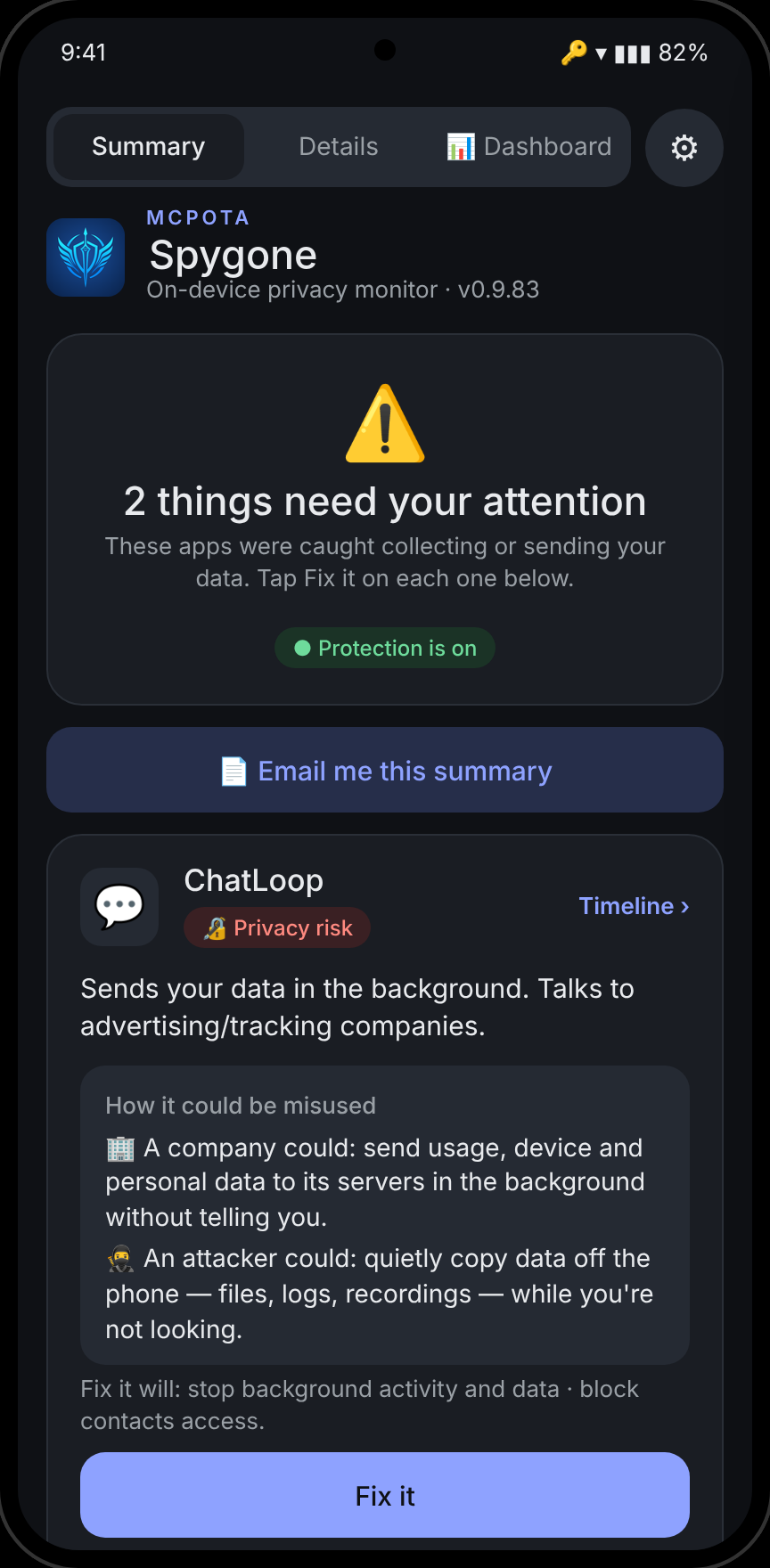
Spygone's Summary screen listing three apps that need attention, with Fix it buttons

Behaviour, not guesswork

Most privacy tools tell you what an app could do. Spygone records what it actually did โ€” when, how often, and who it talked to afterwards.

๐Ÿ”ด Findings you can act on

Every app is rated from what it did in the background. Red means it's sending or collecting your data right now; amber means worth a look; everything else stays quiet.

  • Background location, clipboard, contacts, SMS, photos, mic and camera use
  • Uploads while you weren't using the app, measured per app
  • Advertising and analytics services contacted while closed
  • Plain-English "How it could be misused" โ€” by a company and by an attacker
Findings list with red privacy risks and an amber worth-a-look item

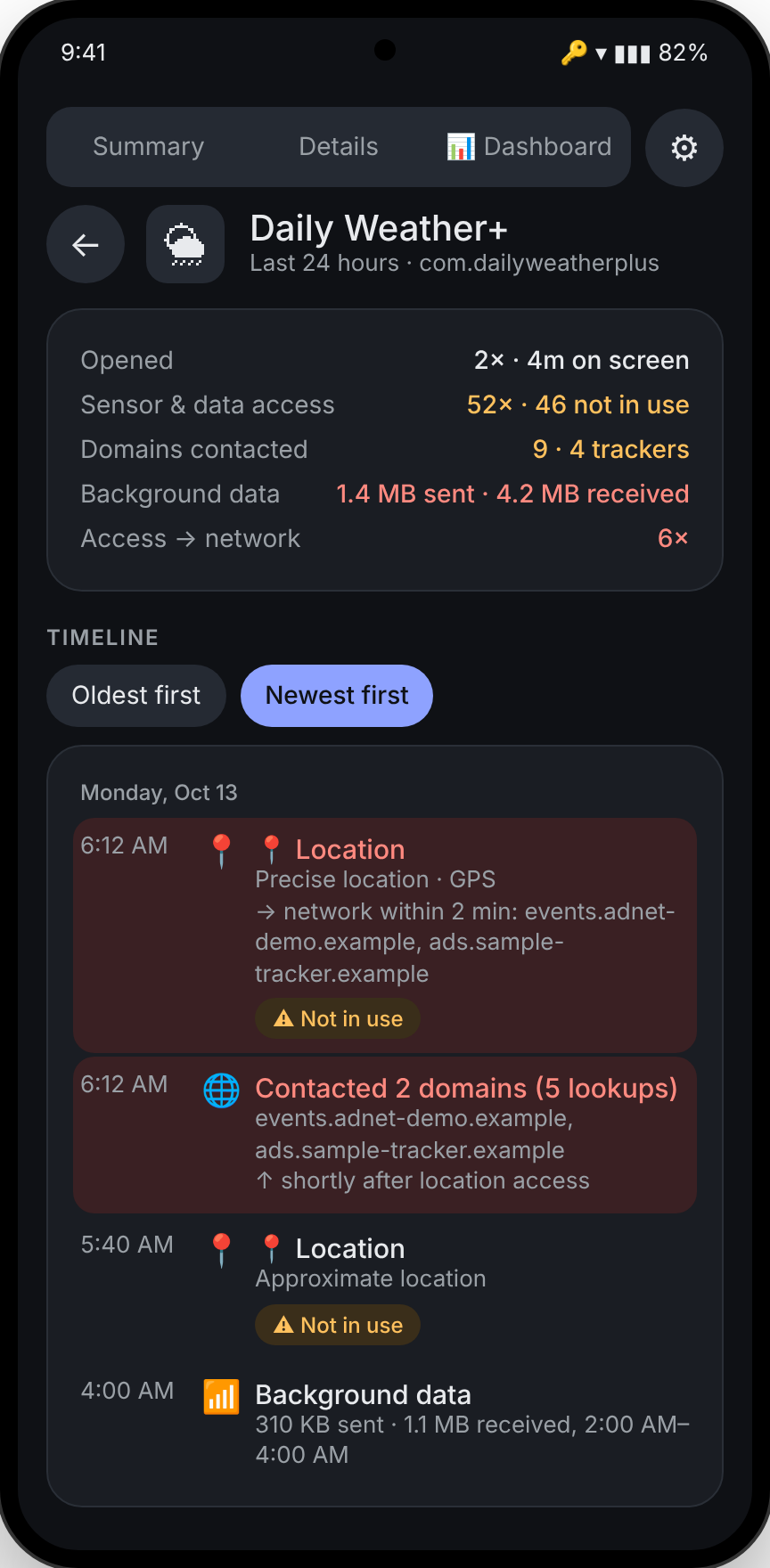
๐Ÿ•’ A timeline for every app

See exactly what an app did and when. Spygone links a sensitive access to the network traffic that followed it โ€” like a weather app reading your location and then contacting an ad network within seconds.

  • At a glance: opens, background accesses, trackers and data sent
  • Every access and every server it contacted, newest first
  • Access โ†’ network links within two minutes
Timeline for a weather app showing location accesses followed by tracker lookups

๐Ÿ›  Fix it in one tap โ€” and undo it in one tap

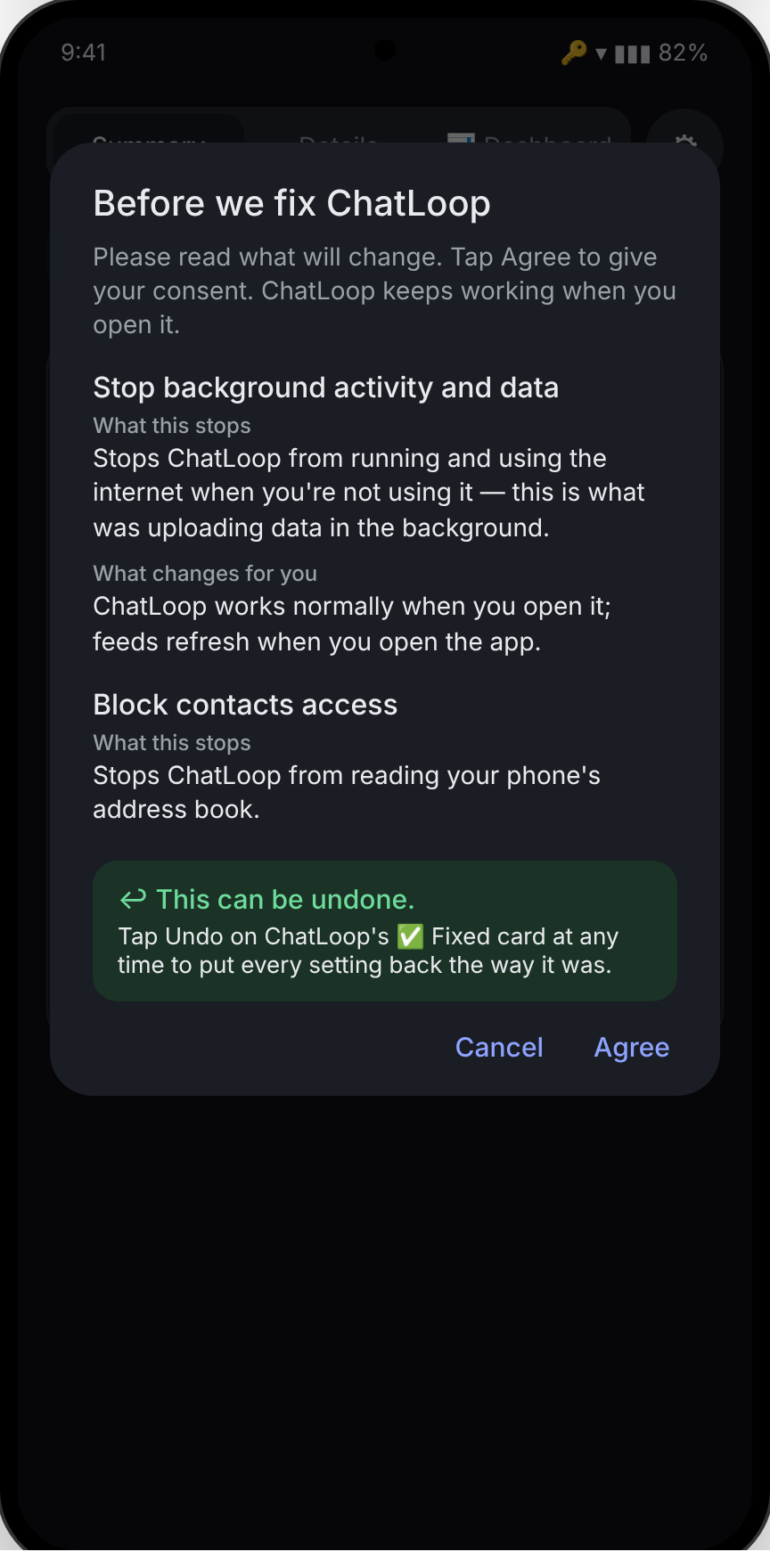
Spygone shows exactly what it will change before it changes anything: restrict the battery, block background data, or remove one permission. The app keeps working while you use it.

  • Clear consent screen for every change
  • Undo any fix, any time
  • Before / after counts in your reports, so you can see it worked
Fix it confirmation listing battery restriction, background data block and contacts block

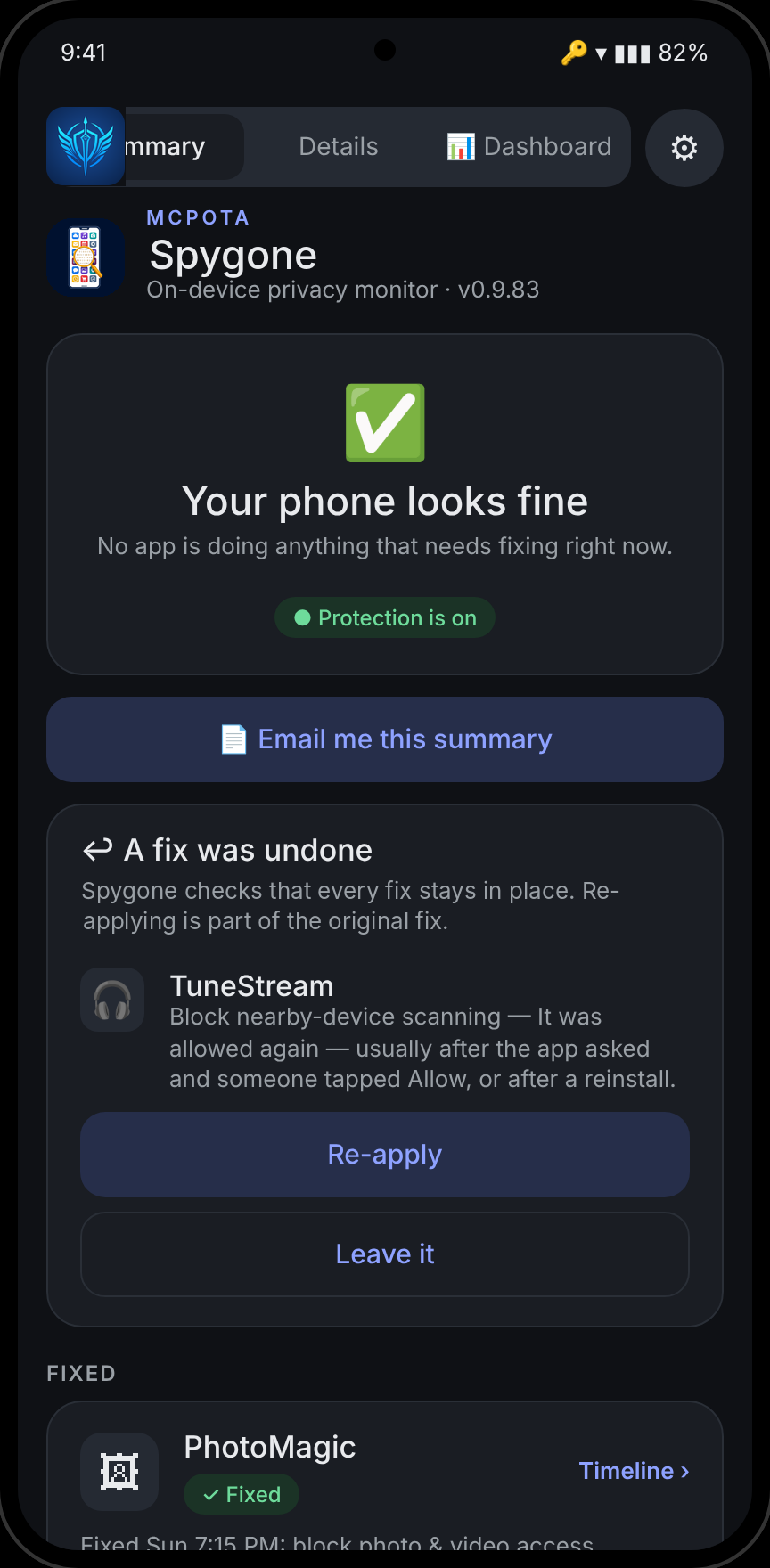
โ†ฉ Fix check: catches fixes that get undone

App updates, reinstalls and system updates can quietly switch a permission back on. Spygone checks every fix and tells you when one was reversed, with Re-apply or Leave it.

  • Checks permissions, background data, battery and disabled apps
  • Explains the likely reason in plain English
  • Re-applying is part of the original fix
A card saying a fix was undone for a music app, with Re-apply and Leave it buttons

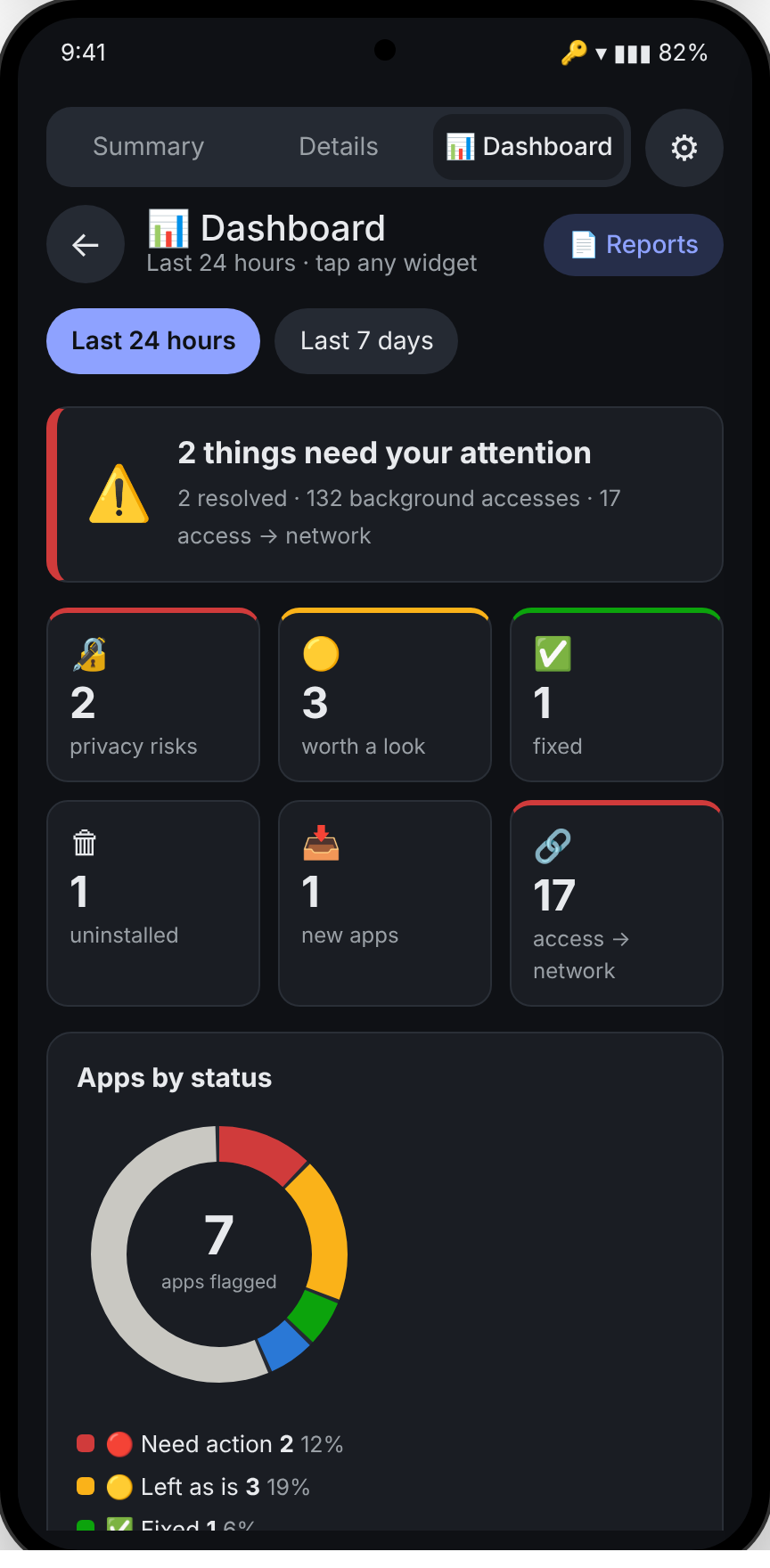
๐Ÿ“Š Dashboard

Today at a glance: privacy risks, background accesses, trackers contacted and data sent. The full version keeps 7 days of history.

  • Most active apps while closed
  • Background data sent, per app
  • Tracker domains and who contacted them
Dashboard with tiles for privacy risks, background accesses and trackers, and a most-active list

๐Ÿ“œ Privacy-policy grades

Each app's privacy policy is graded A to F under MCPOTA's published rules, with the policy's own words quoted for every point. Selling your data or sharing it for ads without an opt-out counts most.

  • Grades are MCPOTA's analysis of quoted policy text, not findings about a company
  • โš– Possible policy breach: when an app does something its policy says it never does
  • Built into the app, so looking an app up never leaves your phone
Dashboard with privacy-policy grades by app

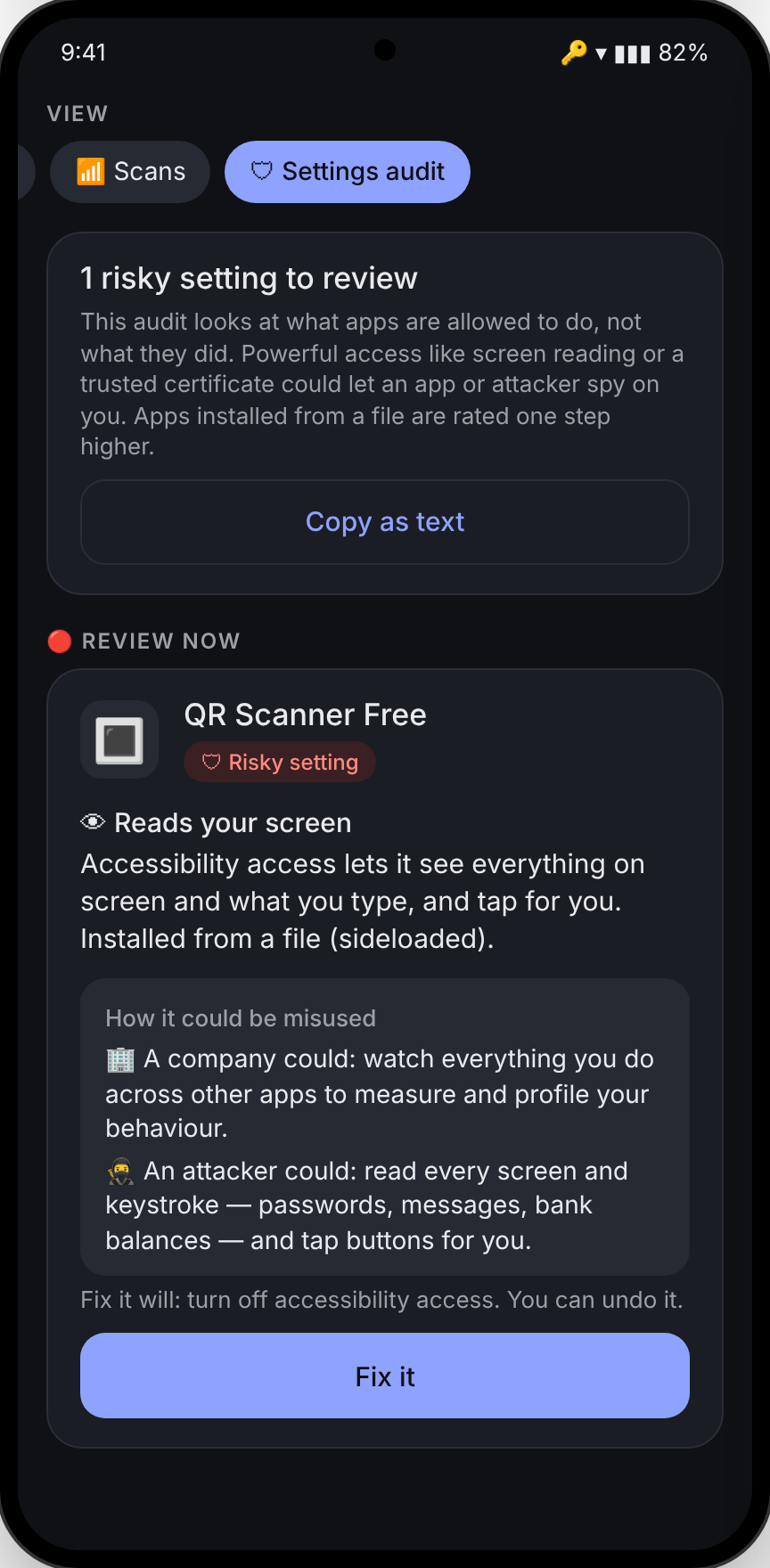
๐Ÿ•ต Spyware check

Separate from behaviour: a check of the access spyware, stalkerware, banking malware and scam apps rely on, plus a match against a public list of known stalkerware. Apps installed from a file are rated one step higher. See everything it checks โ†’

  • Known stalkerware and monitoring apps, by signing certificate or package name
  • Screen readers, notification and text-message readers, phone managers
  • Remote-access apps used in fake bank and tech-support calls
Settings audit showing a sideloaded QR scanner with accessibility access flagged for review

What the spyware check looks for

Red means a known malware pattern or a match on the known-stalkerware list; amber means worth a check; green means checked and normal. Each finding says what was found, how it could be misused, and what you can do.

๐Ÿšจ
Known stalkerwareApps matching a public list of 132 stalkerware and 27 monitoring apps (Echap stalkerware-indicators, CC BY 4.0), checked on the phone.
๐Ÿ‘
Screen readingAccessibility access that sees everything on screen and can tap for you.
๐Ÿ””
Notification readingApps that see every notification, one-time login codes included.
โœ‰
Text-message readersApps other than your messaging app that can read your texts, where login codes arrive.
๐Ÿข
Phone managersDevice admins, device owners and work profiles that can control the phone.
๐Ÿ–ฅ
Remote accessAnyDesk, TeamViewer QuickSupport and similar apps used in fake bank and tech-support calls.
๐Ÿซฅ
Hidden appsInstalled apps with no icon, the way stalkerware hides.
โŒจ
KeyboardsThird-party keyboards that see every password you type.
๐Ÿ“œ
Certificates you addedCertificates that let someone read your encrypted traffic.
๐ŸชŸ
Fake login screensApps that draw over other apps, especially alongside screen reading.
๐Ÿ“ฆ
App installersApps allowed to install other apps from outside the Play Store.
๐ŸŽฅ
Screen captureApps that recorded or cast your screen in the last 7 days.
๐Ÿ”‹
Always runningPowerful apps exempt from battery saving, so Android never pauses them.
๐Ÿ“ณ
Card relayApps that can act as a contactless card, used to steal bank cards over NFC.
โฌ†
Large uploads100 MB or more sent in the background in a day.

Your safety first. Removing stalkerware can alert whoever installed it, so Spygone shows a safety note and links to stopstalkerware.org before you change anything, and never removes it in one tap. Honest limits: a phone app can't see everything. Advanced spyware that hides below the app layer (like Pegasus) needs a forensic check of a backup on a computer; that's what Spygone Desktop, now in early testing, does. Finding nothing doesn't prove a phone is clean.

๐ŸŽ Spygone for iPhone

iPhones don't let any app watch other apps, so the iPhone version works differently: it reads the App Privacy Report that iOS keeps, and walks you through the settings it can't see for itself. In testing on TestFlight.

๐Ÿ“„
App Privacy Report analysisShare the report to Spygone: which apps used your camera, mic, location, contacts and photos, and which domains and trackers they contacted. Read on the phone, never stored.
๐Ÿ›ก
Phone checkA guided look at device management profiles, certificates, VPNs, keyboards, signed-in devices, location sharing and trusted numbers, plus Lockdown Mode and Apple's Safety Check.
๐Ÿ“œ
Policy gradesThe same Aโ€“F privacy-policy grades and โš– possible-breach flags as Android.
โœ‰๏ธ
Ask MCPOTA to reviewSend picked apps' findings to MCPOTA from your own Mail app. You see exactly what's included first.

No background monitoring and no one-tap fixes on iPhone: iOS doesn't allow them. "Fix it" gives directions to the right Settings screen.

๐Ÿ’ป Spygone Desktop for Windows and Mac Early testing

A phone app can only see so much: Android and iOS keep apps in a sandbox. Spygone Desktop runs on your computer and looks deeper, the way security researchers check a phone, without sending your data anywhere. Included with Premium for your own and your family's phones; a Professional license adds what security examiners need.

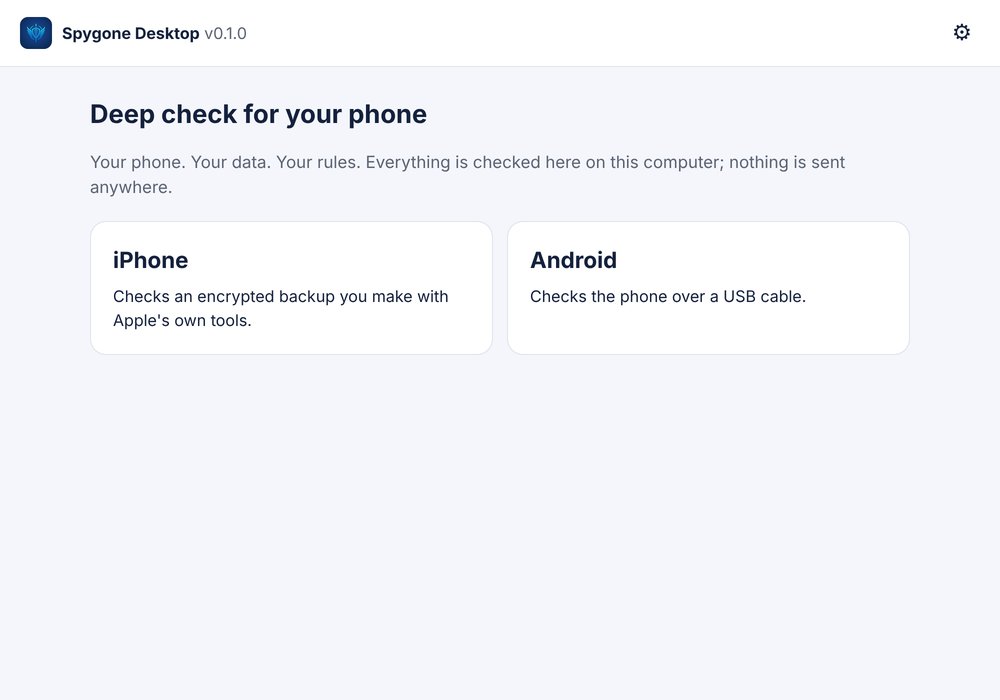
Spygone Desktop's start screen: choose iPhone or Android
Start: iPhone or Android
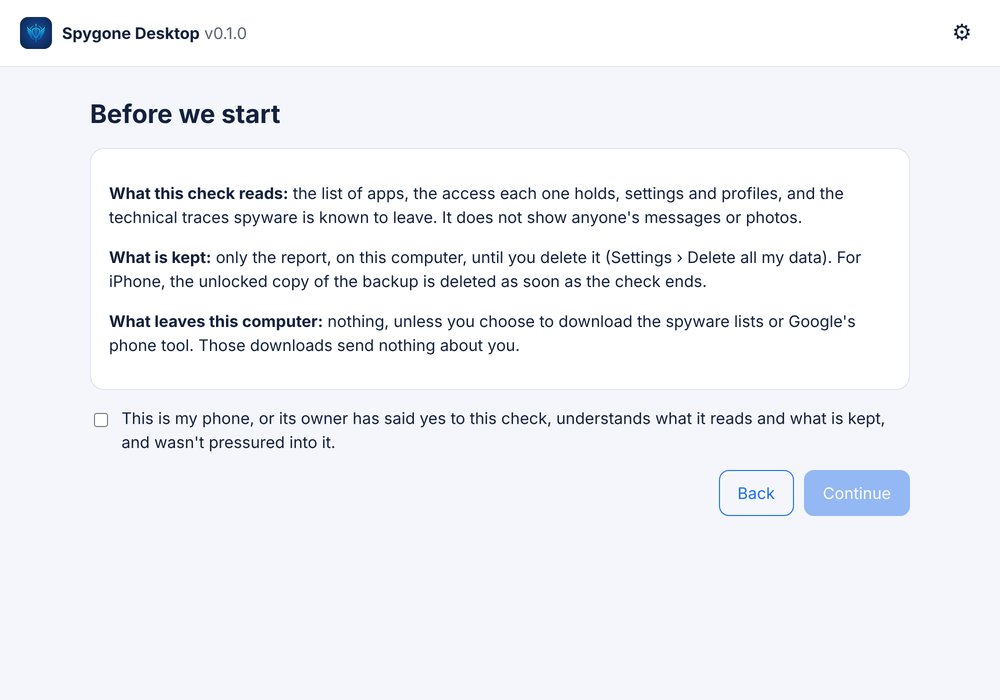
Consent screen explaining what the check reads, what is kept and what leaves the computer
Consent before every check
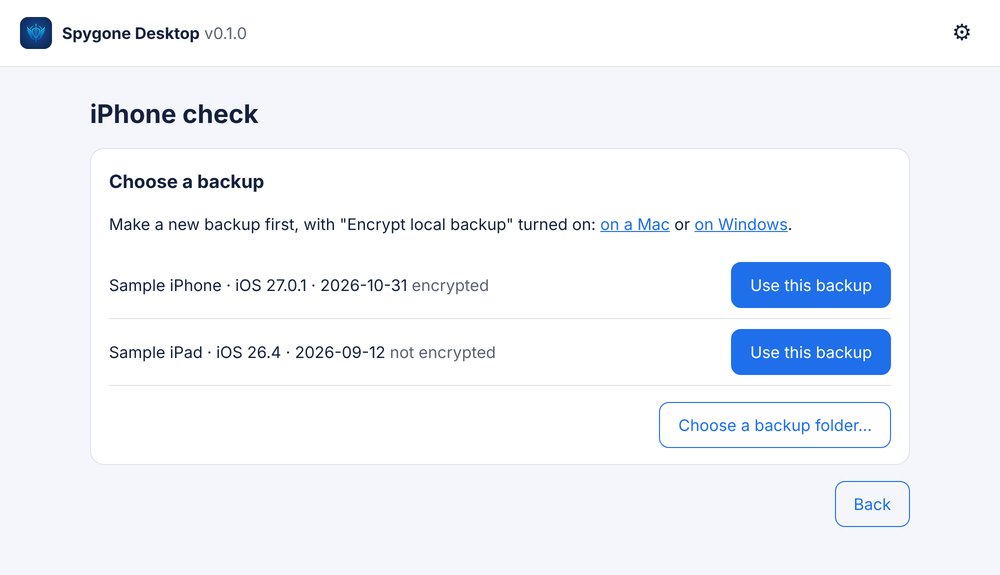
Choosing an encrypted iPhone backup to check
Pick an iPhone backup
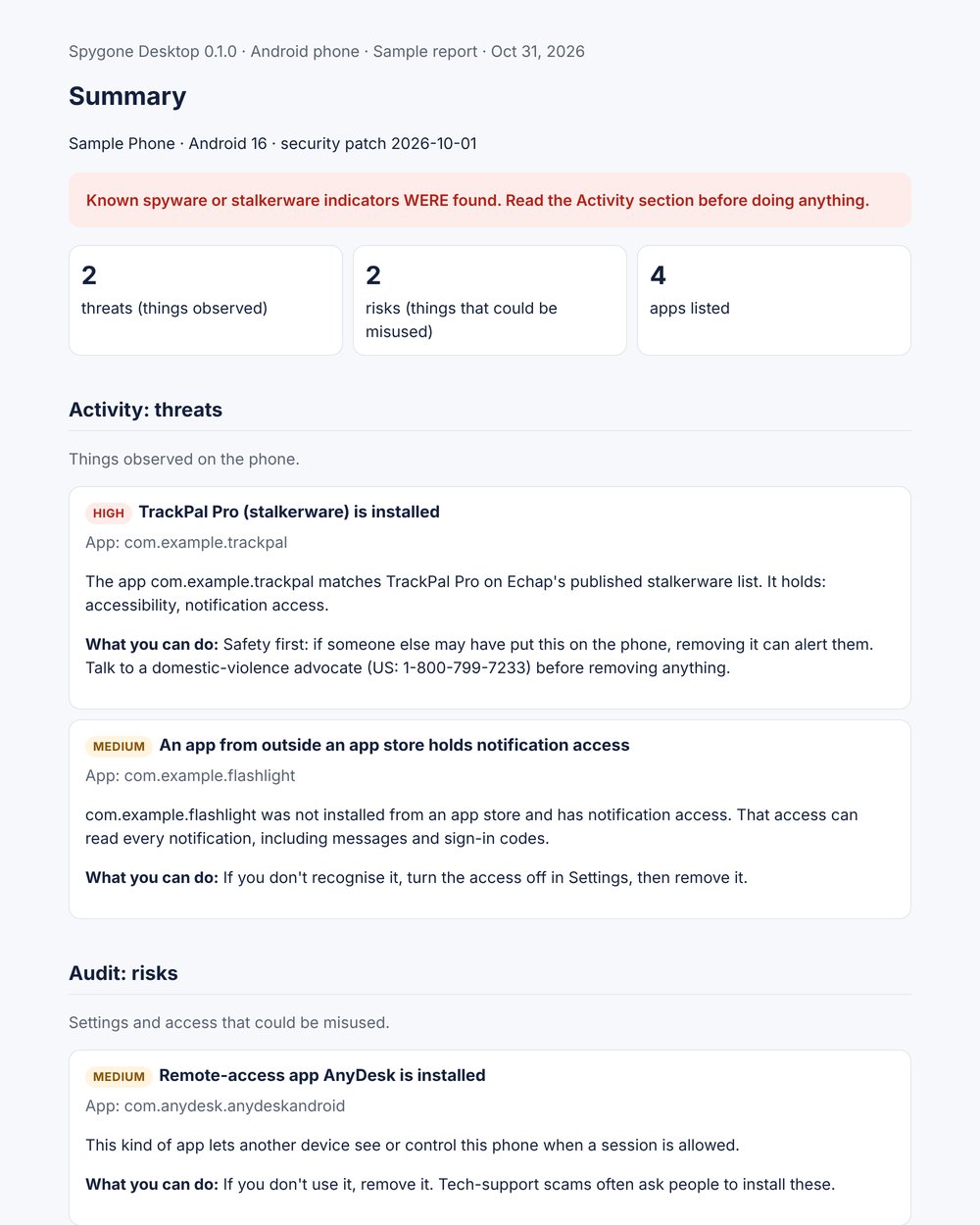
Sample Spygone Desktop report: a summary saying known stalkerware was found, then threats and risks with what to do
Report (sample data)

In the first test build

๐ŸŽ
iPhone deep checkReads an encrypted backup you make with Apple's own tools (Finder on Mac, Apple Devices on Windows) and checks it against published spyware indicators using Amnesty International's Mobile Verification Toolkit, the method researchers use to find spyware like Pegasus. Lists configuration profiles and installed apps.
๐Ÿค–
Android deep checkOver a USB cable: every app, where it was installed from, and which ones hold screen-reading, notification, device-admin or phone-management access. Each app is matched against a public list of known stalkerware by name and by signing certificate.
๐Ÿ“‹
Clear reportsA summary that says plainly whether known spyware or stalkerware was found, then what was observed (threats) and what could be misused (risks), with what you can do about each.

Planned

For security professionals

The Professional license is for examiners hired to check a client's phone, such as executives, public figures and others likely to be targeted. It covers unlimited client phones and adds case folders, a chain-of-custody record with every file fingerprinted, a client consent form, deeper checks with the raw output kept for review, and reports under the examiner's own name and logo.

Spygone Desktop is in early testing; features and pricing may change before release. Join the waitlist to hear when it's ready.

What it watches (Android)

Uses Android's own records โ€” the same ones the system keeps โ€” plus an on-device DNS monitor. Encrypted traffic contents are never inspected.

๐Ÿ“
LocationGPS and network location used while the app is closed.
๐Ÿ“ถ
Wi-Fi & Bluetooth scansScans that reveal where you are even with location off.
๐Ÿ“‹
ClipboardApps reading what you copied โ€” passwords, codes, addresses.
๐Ÿ‘ฅ
Contacts, SMS & callsAddress book and message reads in the background.
๐Ÿ–ผ
Photos & filesLibrary access, including the GPS stored in photos.
๐ŸŽค
Microphone & cameraAny use while the app wasn't on screen.
โฌ†
Data sentPer-app uploads while you weren't using it.
๐ŸŽฏ
TrackersAdvertising and analytics services each app contacts.
๐Ÿ”ด Needs your attention
Collecting or sending your data in the background.
๐ŸŸก Worth a look
Unusual but often explainable โ€” you decide.
โœ… Fine
Normal for the app, or already fixed.

Reports you can share

One tap at the top of Summary emails the executive summary; one tap at the top of Details sends the technical report. Each is made on the phone as a PDF. Built on the phone โ€” nothing is uploaded to make it. These samples use made-up apps and data.

How it works

Install and turn on monitoring
A local VPN watches which servers each app looks up. Nothing leaves the phone.
Optional: advanced access
Pair once with Wireless debugging for the detailed background records and one-tap fixes. No computer or root needed.
Use your phone normally
Findings build up as apps behave. Most phones show something within a day.
Fix, undo, or leave it
Each finding explains why it matters. You decide.

Gallery

Plans Estimated

No ads and no analytics โ€” ever. The subscription is the whole business, so your data never has to be. Spyware and stalkerware detection is free, always.

Free
$0
  • Spyware and stalkerware check, never paywalled
  • Safety guidance before you remove anything
  • Which websites your apps contact (summary)
Standard ยท 7-day free trial
$2.99/month
  • Or $24.99 a year (about $2.08 a month)
  • Ongoing monitoring and alerts
  • Privacy grade for every app, checked against its own policy
  • Reports, one-tap fixes with undo, and Report this app
Premium
$7.99/month
  • Or $59.99 a year
  • Everything in Standard
  • 24-hour Deep Inspection of every connection
  • Alerts when an app reads your data and then sends
  • Evidence package and 12-month history
  • Spygone Desktop for your own and your family's phones (up to 5)
Professional
$149/month
  • Or $1,499 a year, per examiner
  • Spygone Desktop with a Professional license
  • Unlimited client phones
  • Case folders, chain of custody, consent forms
  • Reports under your own name and logo

Prices are estimates and may change before launch, and some Premium and Professional features are still being built. Founding members get their first year of Premium (normally $59.99), including new Premium features as they're released, for $24.99 โ€” join the waitlist. Phone subscriptions are handled by Google Play or the App Store and can be cancelled any time; Professional is sold on mcpota.com.

MCPOTA logo: the twin peaks of Seneca Rocks, West Virginia, above the MCPOTA name

Made by MCPOTA

Arx Dominii Privati โ€” stronghold of private dominion

MCPOTA (Mobile Cyber Privacy Operations & Threat Analytics) makes privacy and utility tools for your phone. Every tool follows the same rules: it works on the device, collects no analytics, and never sells or shares your data.

Spygone is the first. Startsy, a planner that helps you start, is next. Meet MCPOTA โ†’

Private by design

๐Ÿ“ฑ
On-device onlyMonitoring, findings and reports are made on your phone.
๐Ÿ™ˆ
No accountNothing to sign up for. No email required.
๐Ÿ”’
No traffic inspectionOnly which servers apps contact โ€” never what they send.
โœ‰๏ธ
You choose what to shareReports and false-alarm reports go only where you send them.

Read the privacy policy โ†’

Questions

Can it find Pegasus or other government-grade spyware?

Not from the phone app. That kind of spyware hides below the level any app can see. Spygone checks for the access ordinary spyware, stalkerware and scam apps need, and matches apps against a public list of known stalkerware. A forensic check of a phone backup on a computer, the method researchers use for Pegasus, is what Spygone Desktop (in early testing) is for.

What should I do if it finds stalkerware?

Think about your safety before removing it: removing it can alert whoever installed it, and it may be evidence. Spygone shows a safety note and links to stopstalkerware.org, which has guidance and support contacts. It never removes stalkerware in one tap.

Does it work on iPhone?

Yes, differently. iOS doesn't let apps see other apps, so Spygone for iPhone reads the App Privacy Report you share to it and gives you a guided Phone check of the settings stalkerware and scams use. It's in testing on TestFlight. More about the iPhone version โ†’

Does it need root?

No. Basic monitoring works out of the box. The detailed background records and one-tap fixes use Android's Wireless debugging, set up once from the phone itself.

Will it slow my phone or drain the battery?

The VPN only looks at DNS lookups โ€” tiny messages โ€” and passes everything else straight through. Everything else runs on Android records the phone already keeps.

Does it work with another VPN?

Android allows one VPN at a time. If you use another VPN, the DNS part pauses; the access records still work with advanced access.

What if a finding is wrong?

Hide it, and optionally send a false-alarm report to support so the detection can be improved. Hidden findings can be shown again from โš™ โ†’ Hidden findings.

What happens when the trial ends?

At launch, Spygone moves to the free plan: the spyware and stalkerware check keeps working, and you can still undo any fix. Subscribe to Standard or Premium to keep ongoing monitoring and alerts. (In today's test builds, monitoring pauses when the trial ends.)

Which phones and computers are supported?

Android: Android 10 and newer (advanced access needs Android 11 or newer for Wireless debugging). Tested on Samsung Galaxy phones.

iPhone: iOS 17 and newer. Spygone reads the App Privacy Report that iOS keeps (now in testing on TestFlight).

Spygone Desktop: Windows 10 and 11 (64-bit), and Macs with Apple silicon (M1 or newer) on macOS 13 Ventura or newer. It checks iPhones from an encrypted backup and Android phones over a USB cable (early testing).